Encrypt anything locally. Send it through any chat. Nobody in the middle can read it.
Sovereign Encryption is a single HTML file. That's it, no installs, no apps, no .exe. Open it, generate a keypair, share your public key to a correspondent and encrypt messages and files locally. The ciphertext travels over anything like: WhatsApp, Signal, Nostr, email, paper — whichever channel you already use. No google account, no central servers, no tracking, no corporations.
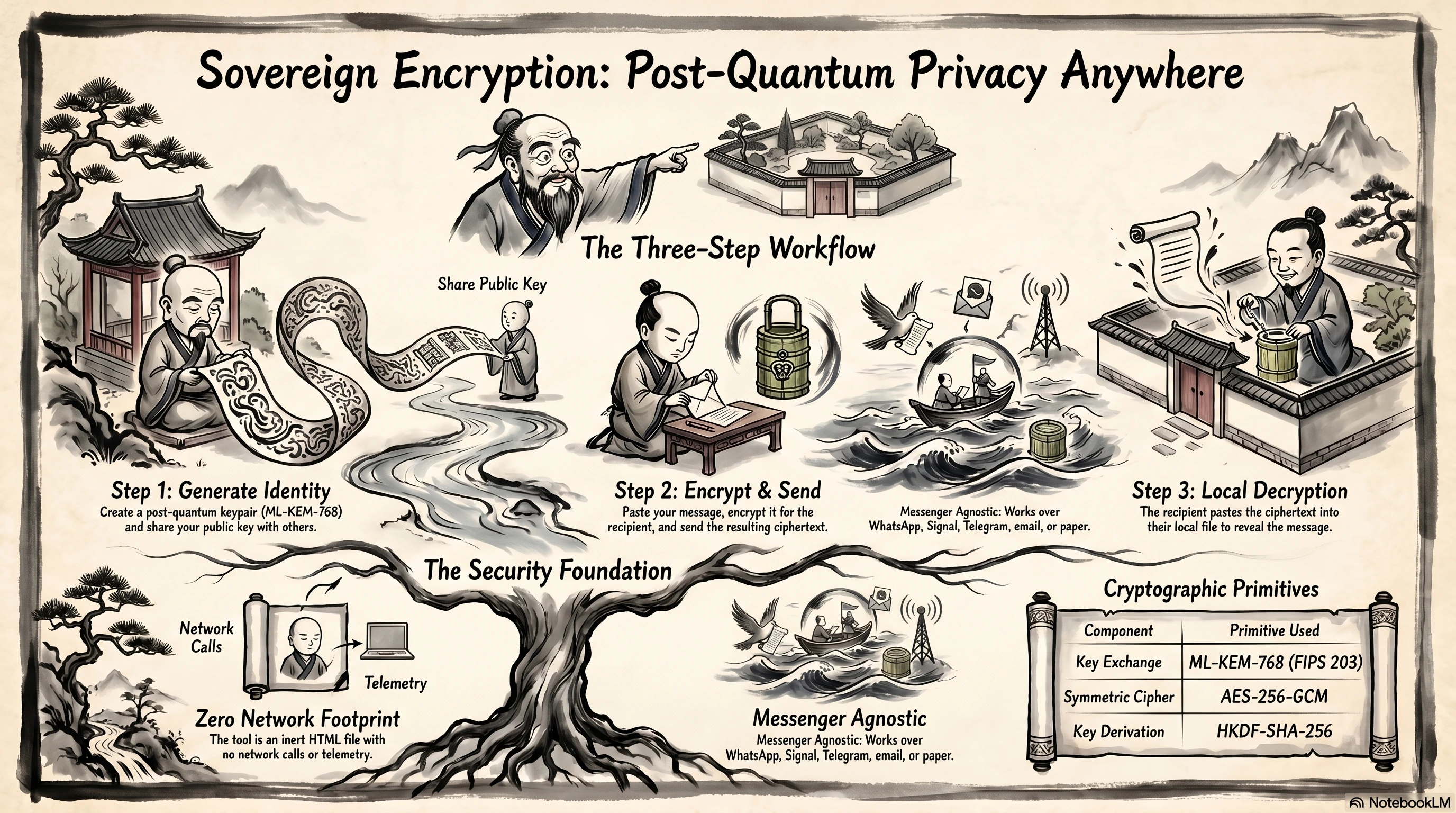
What it is
A short description in plain language.
Imagine your messenger — WhatsApp, Telegram, Signal, email, whatever — as the post office. The post office promises to keep your letters private. But the post office is also a company, in a country, with rules and laws and engineers who can be pressured. If something goes wrong with the post office, your letters go with it.
Sovereign Encryption is an envelope you put your letter into before handing it to the post office. The post office sees a sealed envelope — it can deliver it, but it cannot open it. Only the person you wrote it for can.
The envelope sealer is a single HTML file you open in your browser. It runs entirely on your computer. There is no website, no account to sign up for, no server that sees your messages. You can save the file, copy it to a USB stick, run it on a laptop with the Wi-Fi turned off.
The messenger does the delivery. Sovereign Encryption does the privacy.
How it works
Three steps. Same as the infographic above, in English.
In your browser
You type a message or pick a file. Your browser encrypts it using your recipient's public key — something you collect once, like an email address. The result is a chunk of ciphertext that only their private key can unlock.
Through any messenger
Paste the ciphertext into a normal chat or download the .locked file and attach it. The messenger sees only random-looking characters. It can't read the content, and neither can anyone watching the network.
Recipient opens the page
They open their own copy of Sovereign Encryption — the same standalone HTML page does both encryption and decryption. They paste the ciphertext you sent them and click Decrypt. The message appears. They can reply the same way.
The whole exchange involves no third party once you've swapped public keys. There is nothing for an outsider to subpoena, no server to break into, no account to compromise.
Why this matters
A few reasons people use it.
Your messenger can change its mind
Every major messenger has, at some point, changed its privacy stance, added scanning, or had a breach. End-to-end encryption inside a closed app is only as durable as the app's commitment. Putting the encryption outside the app means you keep control even when the app doesn't.
Quantum computers, eventually
Classical key-exchange algorithms (RSA, elliptic-curve) will eventually be broken by sufficiently large quantum computers. Adversaries are already recording encrypted traffic today, hoping to decrypt it later — the so-called "harvest now, decrypt later" attack. Sovereign Encryption uses ML-KEM-768, a NIST-standardised post-quantum key exchange (FIPS 203, August 2024), so a future quantum computer doesn't retroactively expose today's messages.
No accounts means no metadata
There is no signup. There is no login. The tool doesn't even know your name. The only persistent state on your machine is your .se.key file (which you control) and a local address book stored in your browser. There is no server to leak.
It works offline
Once you've saved the HTML file, the tool runs with no network at all. You can verify this yourself in DevTools — the Network tab stays empty while you use it.
For technical users
The minimum you need to know before trusting the construction.
Primitives
| Role | Algorithm |
|---|---|
| Key encapsulation | ML-KEM-768 (FIPS 203) |
| Symmetric cipher | AES-256-GCM, 12-byte IV per message; AEAD over the header |
| Key derivation | HKDF-SHA-256 over the ML-KEM shared secret, salt = SHA-256(header) |
| Optional private-key wrap | Argon2id (t=5, m=128 MiB, p=1) + AES-256-GCM |
| Fingerprint | First 8 bytes of SHA-256 over the public key, hex, dash-grouped: XXXX-XXXX-XXXX-XXXX |
Text wire format (v7)
"TS4" (3 B) + 0x07 (version) + 0x01 (kemId = ML-KEM-768)
  + IV (12 B)
  + ctKemLen (u16 BE) + ctKem (1088 B)
  + AES-256-GCM ciphertext
The whole thing is hex-encoded for paste-into-chat use. The 1106-byte header is bound as AEAD additional-data, and the HKDF salt is SHA-256(header), so any tamper with the header both fails the AEAD tag and derives a different message key. Legacy v6 blobs (empty HKDF salt) still decrypt.
File wire format (TS4F v8 — streaming, binary)
"TS4F" + 0x08 + 0x01 (kemId)
  + ctKemLen (u16 BE) + ctKem (1088 B)
  + baseNonce (8 B) + chunkSize (u32 BE = 1 MiB)
  + totalSize (u64 BE) + numChunks (u32 BE)
  + flags (1 B) + fname / mime / [senderPK]
  + AES-256-GCM ciphertext chunks
Each chunk uses nonce = baseNonce ‖ u32be(i) and AAD = SHA-256(header) ‖ u32be(i) ‖ lastFlag. The lastFlag bit makes truncation detectable. Working memory is one chunk (~1 MB) regardless of file size — input is read via file.slice(), output goes straight to disk via showSaveFilePicker when the browser supports it.
Older armored-text file formats (TS4F v6 / v7) and the legacy .timeseed.* filenames still decode, so anything you encrypted with previous builds will still open.
File extensions used on disk
.se.pub for your public key, .se.key for your private key (optionally wrapped with Argon2id + AES-256-GCM), .locked for an encrypted file. Legacy .timeseed.pub and .timeseed.key still load.
File-size limits — and what your recipient needs
Files encrypt in 1 MB chunks, so the encoder's memory ceiling is small. In practice:
- Up to ~200 MB — almost any device, including phones.
- ~200 MB to ~5 GB — modern desktop browsers, especially Chrome or Edge where Save File Picker streams the output straight to disk.
- Above ~5 GB — best effort. Often works on flagship laptops, will likely fail on memory-constrained devices.
The recipient needs similar capability. A 4 GB .locked file produced on a fast laptop will fail to decrypt on a low-memory phone. The decoder is symmetric with the encoder: if your hardware/browser can encrypt a file of size X, it can also decrypt one of that size — and if your recipient's hardware can't, they won't be able to open it.
The tool warns before processing files in the 200 MB – 5 GB range, and warns more strongly above 5 GB. The same tier applies on decrypt.
Threat model — be honest about it
Sovereign Encryption gives you confidentiality: nobody but the holder of the matching private key can read the plaintext. It does not by itself give you authenticity. If an attacker can hand you their public key while claiming to be your friend, you'll encrypt to the attacker.
The fix is to compare fingerprints out-of-band — in person, on a voice call where you recognise each other, or via a channel you already trust. The Identity Passport view in the tool exists to make this comparison easy and visual.
Browser primitives used
crypto.subtle (Web Crypto), crypto.getRandomValues, WebAssembly (for Argon2id), localStorage (for the address book and the self-test cache), and showSaveFilePicker where available (streaming file output on Chromium-based browsers). The startup self-test verifies the core primitives (RNG, ML-KEM, AES-GCM) before the page lets you do anything; a fuller verification panel covers SHA-3, HKDF, Argon2, and the Amulet wordlist on demand.
Source code
The entire application is the HTML file. There is no build step. Open it in a text editor and read the source: helpers, parser, UI wiring, crypto routines. The ML-KEM library and Argon2 WASM are inlined; their respective sources are pointed to in the file comments.
Get the tool
Download the file, open it, use it.
Right-click and save, or open it directly in the browser:
It is a single file. You can email it to yourself, put it on a USB stick, host it on any static web server, or run it from file://. There is nothing else to install.